JS Notes
Javascript basics
Basics
You can use %%script node magic statement in ipynb to run js in jupyter.
Common, Keywords, operators, statements
| Keyword & Operators | Notes |
|---|---|
| var, let, const | All used for define variables, let and const are preferred. const means const reference to variable not constant values, the values and properties that the object can be changed but no redeclaration and etc.
|
| Math |
|
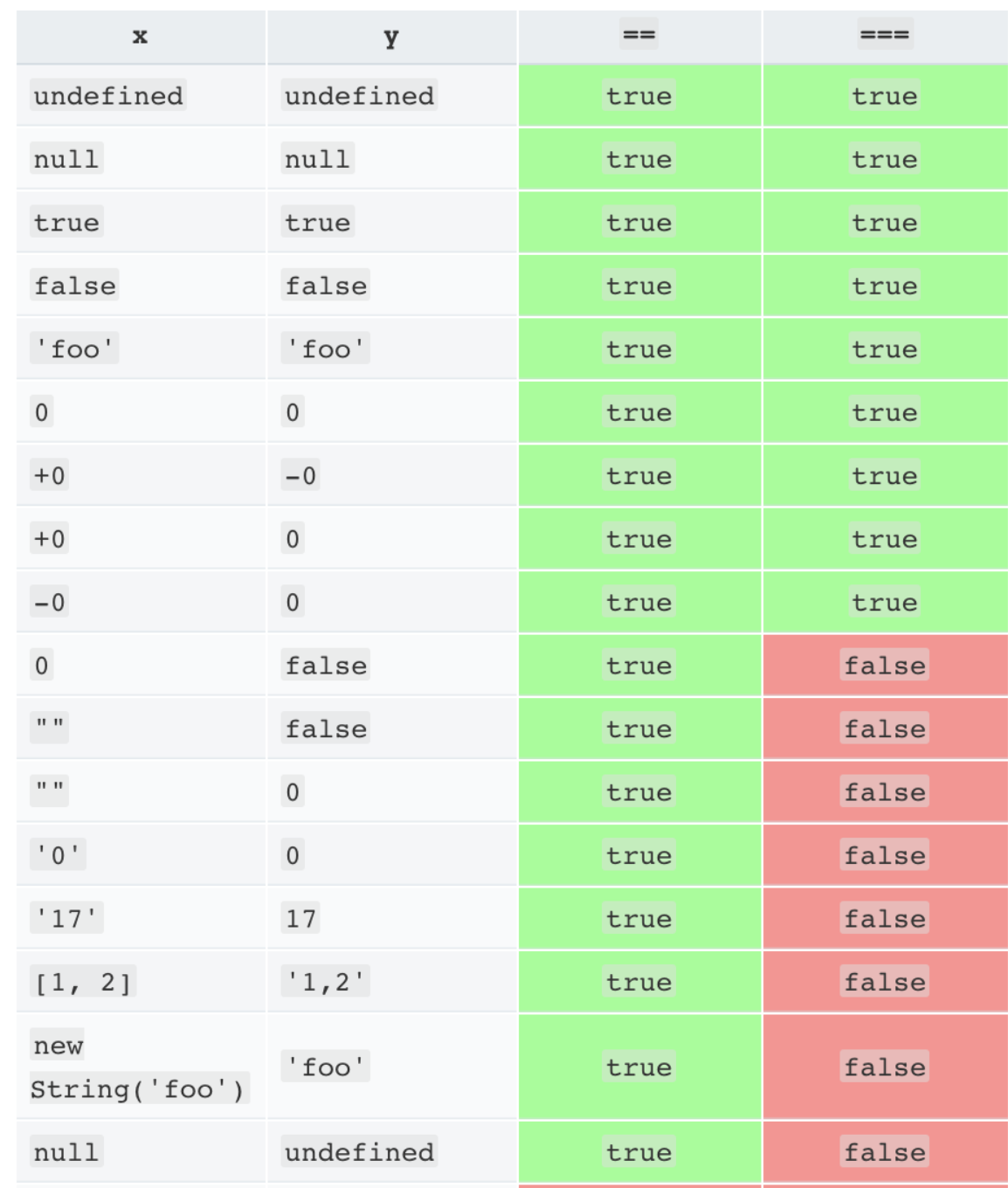
| Comparison |
|
| logic | logical comparison operators && for and, || for or, ! for not. |
| logical assignment | logical and, or, nullish coalescing assignment operators use the value on the left side as condition to determine the assignment. More on Logical Assignment |
| Spread operator | ... splits iterables into elements |
| null and undefined | undefined are used for variables declared but not assigned value, null means intentional abscence |
Logical Assignment
or (||=) Assigns the right-hand value only if the left-hand value is falsy (false, 0, "", null, undefined, NaN).
// OR
let a = 0;
a ||= 5; // a = 5

// Equivalent
if(!a){
  a = 5;
}
and (&&=) Assigns the right-hand value only if the left-hand value is truthy.
let b = 10;
b &&= 20; // b = 20

// Equivalent
if(b){
  b = 20;
}
nullish coalescing assignment (??=) Assigns the right-hand value only if the left-hand value is null or undefined (not just falsy).
let a = null;
a ??= 123; // a = 123

// Equivalent
if (a == null || a == undefined){
  a = 123;
}
Conditional Statements
if, else if, else
if (condition){

} else if (condition2) {

} else {

}
Ternary Operator
condition ? expression1 : expression2;

// Same as
if(condition)
  expression1;
else
  expression2;
3 types of loops
Switch
switch is the same as c++ and use strict comparison(===) for expression and cases.
switch(expression){
  case a:
    break;
  case b:
    break;
  case c:
    break;
  default: // Optional as fallback
    // something
}
for loop
for(let i = 0; i < 10; i++){
  console.log(i);
}
while loop
while(condition){
  // something
}
do while loop
do{
  // codes
} while (cond);
labels
A label can be used to name a statement or block , allowing us to reference them when using breaks and continue.
labelname: statement;

labelname: {
  statements
}

// break labelname;
loop1: for(let i = 0; i < 10; i++){
  console.log("loop1=" + i)
  loop2: for(let j = 0; j < 10; j++){
    if(j === 5){
      break loop1;
    }
    else if(j === 3){
      continue loop2; // Skip j = 3
    }
    console.log(j)
  }
}
Functions
The Syntax
function fun1(p1, p2){
  return p1 + p2;
}
You can assign function return to variable also without return.
let value = fun1(1, 2); //valid
let value2 = fun1;      // valid
Arrow function
let func = function(a, b){ return a * b;};

let func1 = (a, b) => a * b;
Get parameters value
We use backtick and ${} called template string/literals.
function fun1(name, balance){
  console.log("The name is " + name);
  return `${name}: $ ${balance}`;
}
Objects
const person = {name: "Jack", balance: 12345, age: 23};
const person1 = new Object({
  name: "Jack",
  balance: 12345,
  age: 23
});

person.name = "NewName";
person['name'] = "NewerName";
Object Constructor Function
function Person(name, age) {
  this.name = name;
  this.age = age;
  this.greet = function() {
    console.log(`Hello, my name is ${this.name} and I am ${this.age} years old.`);
  };
}

const p1 = new Person("Hello", 1234);

console.log(p1.name);
Structured Data Types
mdn_ documentations on js data types and data structures
More on Objects (hash tables)
Similar to dict in python. JavaScript uses prototypal inheritance, not classical inheritance like Java or C++.
Every object in JavaScript has an internal link to another object called its prototype.
The prototype itself can have its own prototype, forming a prototype chain.
When you access a property on an object:
- JS first looks at the object itself.
- If not found, it looks up the prototype chain.
const person = {
  name: "something",
  age: 123,
  balance: 12345,
  get_info: () => {
    console.log(`${person.name}, ${person.age}`);
  },
};

// or

const person = {
  name: "something",
  age: 123,
  balance: 12345,
  get_info: function() {
    console.log(`${this.name}, ${this.age}`);
  },
};


person.get_info() // -> something, 123
We can't use this with the first implementation of get_info because arrow functions don't have their own this. Instead, they "close over" the this value from their surrounding scope.
The surrounding scope is the file/module (or global scope if in a browser), not the person object. If you write this.name or this.age inside that arrow function, it won’t point to person. It will usually be undefined (in strict mode) or the global object (in sloppy mode).
Rule of thumb
- Use regular functions for object methods if you need
this. - Use arrow functions when you want to capture the
thisof the surrounding scope (common in callbacks).
Arrays
Similar to Python list, heterogeneous (mixed types) can be stored in one array and dynamic size.
// Creation
const x = ["hi", '1', 123];

x[0] = "New Value";

const y = new Array(a, b, c);

// Convert to String
y.toString() // Converts to string with comma separated elements
Map
const map = new Map();

map.set("a", 1);
map.set("b", 2);
map.set("c", 3);

console.log(map.get("a"));
// Expected output: 1

map.set("a", 97);

console.log(map.get("a"));
// Expected output: 97

console.log(map.size);
// Expected output: 3

map.delete("b");

console.log(map.size);
// Expected output: 2


const contacts = new Map();
contacts.set("Jessie", { phone: "213-555-1234", address: "123 N 1st Ave" });
contacts.has("Jessie"); // true
contacts.get("Hilary"); // undefined
contacts.set("Hilary", { phone: "617-555-4321", address: "321 S 2nd St" });
contacts.get("Jessie"); // {phone: "213-555-1234", address: "123 N 1st Ave"}
contacts.delete("Raymond"); // false
contacts.delete("Jessie"); // true
console.log(contacts.size); // 1
const myMap = new Map();
myMap.set(0, "zero");
myMap.set(1, "one");

for (const [key, value] of myMap) {
  console.log(`${key} = ${value}`);
}
// 0 = zero
// 1 = one

for (const key of myMap.keys()) {
  console.log(key);
}
// 0
// 1

for (const value of myMap.values()) {
  console.log(value);
}
// zero
// one

for (const [key, value] of myMap.entries()) {
  console.log(`${key} = ${value}`);
}
// 0 = zero
// 1 = one
const myArray = [
  ["key1", "val1"],
  ["key2", "val2"]
]

const myMap = new Map(myArray);

console.log(myMap.get("key1"));
console.log([...myMap]);

Array.from(myMap); // Convert from map to array

const myMap_copy = new Map(myMap);  // Clone
const merged = new Map([...myMap, ...myMap_copy]);  // Merge
Example: Get Prime Numbers
function primes(start, end) {
  if (start > end) {
    return [];
  }

  const res = [];
  // Ensure the start of the range is at least 2, since 1 is not a prime.
  const correctedStart = Math.max(2, start);

  // Loop through each number in the specified range.
  for (let i = correctedStart; i <= end; i++) {
    let is_prime = true;
    // Check for divisibility from 2 up to the square root of the number.
    // This is more efficient than checking up to `i`.
    for (let j = 2; j * j <= i; j++) {
      if (i % j === 0) {
        is_prime = false;
        break; // A single divisor means it's not prime, so we can stop checking.
      }
    }
    // If the loop completes without finding a divisor, the number is prime.
    if (is_prime) {
      res.push(i);
    }
  }

  return res;
}

console.log(primes(1, 100));
function n_primes(n) {
  const res = [];
  let curr_num = 2;

  while (res.length < n) {
    let is_prime = true;
    // Check for divisibility up to the square root of the current number.
    for (let i = 2; i * i <= curr_num; i++) {
      if (curr_num % i === 0) {
        is_prime = false;
        break; // Not a prime, stop checking and move to the next number.
      }
    }

    if (is_prime) {
      res.push(curr_num);
    }
    curr_num++; // Always increment the number to check in the next iteration.
  }

  return res;
}

console.log(n_primes(10));
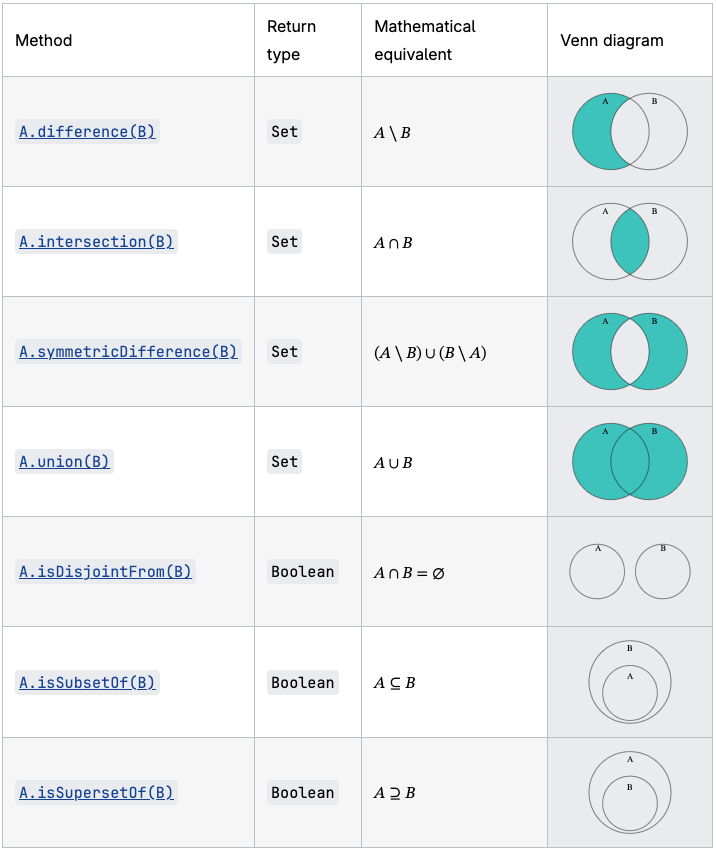
Set (Hash set)
WeakSet
- Can only store objects.
- Objects stored in weakset can be garbage collected when no other reference is refercing it.
- Can't be iterate over, unlike
set() - Objects are removed from the
weaksetwhen it's garbage collected elsewhere - Objects in
weaksetare unique, can't access individual element or checking the size.
// Create a new WeakSet
let weakSet = new WeakSet();

// Create objects to use in the WeakSet
let obj1 = { name: "Pranjal" };
let obj2 = { name: "Pranav" };
weakSet.add(obj1);
weakSet.add(obj2);
weakSet.delete(obj1)
obj2=null
console.log(weakSet.has(obj1))
console.log(weakSet.has(obj2))

// Output:
// false
// false
JSON
JavaScript Object Notation (JSON) is a text-based format for representing object data in javascript syntax.
const data =
`{
  "name": "Some name",
  "age": 123,
  "members": [
    {
      "name": "child",
      "age": 23
    },
    {
      "name": "child1",
      "age": 13
    }
  ]
}`;

// Str in json format to obj
person = JSON.parse(data);

person.age = 333;
console.log(person);


const myJSON = JSON.stringify(person);
console.log(typeof(myJSON));
Dates
new Date()
new Date(date string)

new Date(year,month)
new Date(year,month,day)
new Date(year,month,day,hours)
new Date(year,month,day,hours,minutes)
new Date(year,month,day,hours,minutes,seconds)
new Date(year,month,day,hours,minutes,seconds,ms)

new Date(milliseconds)
Error Handling
try {
  let x = 10;
  let y = 0;
  if (y === 0) {
     // Custom error thrown
    throw new Error("Cannot divide by zero!");  }
  let result = x / y;
  // This line won't be reached if an error occurs
  console.log("Result:", result);
}
catch (error) {
  // Handles the error
  console.error("An error occurred:", error.message);
}
finally {
  // Cleanup or final actions
  console.log("This code always runs, regardless of errors.");
}
Function
this
this refers to the object that you are currenlty container in.
- Default and within functions,
thisrefers to the global object strictmodethisis undefined within funciton- In
object,thisrefers to the object itself - In
event,thisrefers to the element received the event
let x = fun();

function fun() {
  return this;  // The global scope
}

console.log(x);
Output
  <ref *1> Object [global] {
  global: [Circular *1],
  clearImmediate: [Function: clearImmediate],
  setImmediate: [Function: setImmediate] {
    [Symbol(nodejs.util.promisify.custom)]: [Getter]
  },
  clearInterval: [Function: clearInterval],
  clearTimeout: [Function: clearTimeout],
  setInterval: [Function: setInterval],
  setTimeout: [Function: setTimeout] {
    [Symbol(nodejs.util.promisify.custom)]: [Getter]
  },
  queueMicrotask: [Function: queueMicrotask],
  structuredClone: [Getter/Setter],
  atob: [Getter/Setter],
  btoa: [Getter/Setter],
  performance: [Getter/Setter],
  fetch: [Function: fetch],
  crypto: [Getter],
  navigator: [Getter]
}
Partial Functions
We can fix some arguments of a function for future use.
function adder(a, b){
  return a + b;
}

let add_5 = adder.bind(null, 5);

console.log(add_5(5));
Function without context
We can fix some arguments without fixing the context.
function partial(func, ...argsBound){
  return function(...args){
    return func.call(this, ...argsBound, ...args);
  }
}

let user = {
  name: "User",
  method(a, b){
    console.log(`${this.name}, A: ${a}, B: ${b}`);
  }
}

user.says = partial(user.method, "Some A");
user.says("Some B");
Delete and Destructure
function Person(name, age){
  this.name = name;
  this.age = 123;
}

let x = new Person('Something', 123);
let y = new Person('Something1', 234);

// Deletes name property from x
delete x.name;
console.log(x);

// Deconstruct
const {age, ...withoutAge} = y;

// Prints age and withoutAge Person object
console.log(age, withoutAge);
Classes
Basic Syntax, getter/setter
class MyClass {
  constructor() {
    // Inits
    this.name = name;
  }

  get name(){
    return this._name;
  }

  set name(value){
    this._name = value;

  }

  methods1() {

  }
  methods2() {

  }
}
get and set function allows you to get and set the property without using () at the end like a method. (e.g. calling instance.name = new_name instead of instance.name() = new_name)
_ needs to be added infront of the variable name for getter and setter for the following reason:
Trying to get this.name in getter will invoke getter in this, which is the getter itself in the current object. This will trigger get name() method, which invokes itself again in a loop. (Same applies to setter)
class User{
  constructor(name){
    this.name = name;
  }

  greeting(){
    console.log(this.name + " says hi!");
  }
}

let user = new User("Pink");
user.greeting();
Binding
this in JavaScript is determined by how a function is called, not where it’s defined. This sometimes causes functions to "lose" their original object context.
class Example{
  constructor(value){
    this.val = value;
  }

  method(){
    console.log(this.val);
  }
}

const x = new Example(23);
x.method(); // 123
Example 1: Detached Method
const method = button.method;
method(); // ❌ TypeError: Cannot read properties of undefined
- button.method is copied into a variable.
- When called as method(), there’s no object before the dot → this becomes undefined (in strict mode).
- The
button.method()will outputerrorinstead ofthis.valbecause method was detached from the original object scope (losingthisreference).
Example 2: Passing Method as Callback
const method = button.method;
method(); // ❌ TypeError: Cannot read properties of undefined
setTimeoutexecutes button.method as a plain function, sothisis lost.
Example 3: Event Listener
class Example {
  constructor(value) {
    this.val = value;
  }
  show() {
    console.log(this.val);
  }
}

const button = new Example("clicked!");
document.querySelector("button")
  .addEventListener("click", button.show);

// ❌ Logs "undefined" instead of "clicked!"
- The DOM sets
thisto the button element, not your class instance.
Example 4: Object Method Copied Out
const obj = {
  x: 42,
  getX() {
    return this.x;
  }
};

const retrieveX = obj.getX;
console.log(retrieveX()); // ❌ undefined
retrieveXis called as a plain function, sothisis lost.
Two ways to bind method to object so 'this' will not lose context.
- Use
bind - Use
Arrow function - Wrapper
class MyClass{
  constructor(value){
    this.value = value;

    // Bind the function to object
    this.click = this.click.bind(this);
  }

  click(){
    console.log(this.value);
  };

  // Use arrow function to bind
  click2 = () => {
    console.log(this.value);
  };
}

let button = new MyClass(123);

setTimeout(button.click, 1000);
setTimeout(button.click2, 1000);
setTimeout(() => button.click(), 1000);
- Methods from objects work fine with
thiswhen called directly on the object. thisis lost when- Store method as variable
- Pass as callbacks
- Caller redefine
this(DOM event listeners)
To avoid this issue, use bind, arrow function, wrapper.